Why I'm Learning to Train Models
It's July 2026, and I've set myself a goal that feels both timely and necessary: seriously level up my LLM engineering skills. Not just prompting, not just fine-tuning — actually understanding how these models work from the ground up, how they're trained, and what happens when you push real data through them.
The catalyst is Sebastian Raschka's book "Build a Large Language Model (From Scratch)", published by Manning. It doesn't just explain transformers — it walks you through building a GPT-style LLM in PyTorch, step by step, from text embedding and attention through pretraining and fine-tuning. The companion code repo on GitHub is excellent.
But reading about training isn't the same as doing it. So I decided to pair the book with a real project: train a model that generates SVG icons.
The Project: IconShop
I teamed up with a good friend of mine in California — someone who shares the belief that the people who understand model training will have an unfair advantage in the years ahead. We found an open-source project called IconShop, forked it, and got to work.
IconShop is based on the paper "IconShop: Text-Guided Vector Icon Synthesis with Autoregressive Transformers" by Ronghuan Wu, Wanchao Su, Kede Ma, and Jing Liao (arXiv:2304.14400, 2023). The idea is elegant — feed the model thousands of SVG icon definitions, train it to understand the structure and patterns of vector graphics, then prompt it to generate new icons. Instead of calling an API or picking from a library, you get a model that creates icons on demand.
The original repo is kingnobro/IconShop on GitHub. My fork is at [GitHub link coming — will provide].
The Model Architecture
Here's what we trained:

A 16-layer transformer decoder with 1024 hidden dimensions, 8 attention heads, and 512 embedding dimensions. Trained on the FIGR-SVG dataset — a collection of icon-style SVGs specifically designed for this kind of autoregressive generation task.
Training Run #1
We booked a GPU rig and let it run for two days. Here's what we put through it:
Six epochs, roughly 200,000 training steps, over the course of two full days on rented GPU hardware. Not a massive run by modern standards, but more than enough to see if the approach works.
First Results
The model works. It can generate SVG icons from text prompts. Is it perfect? Absolutely not. There are artifacts, inconsistencies, and the occasional hallucination where the output is valid SVG but not quite the icon you asked for.
But it does produce recognizable, usable icons. And that's the point — this isn't about shipping a product. This is about learning what model training actually feels like: watching loss curves, adjusting hyperparameters, waiting through epochs, and seeing your first outputs come back from a model you trained yourself.
Sample Outputs
Below are some of the icons our first model generated. These are raw outputs — no post-processing, no human editing.
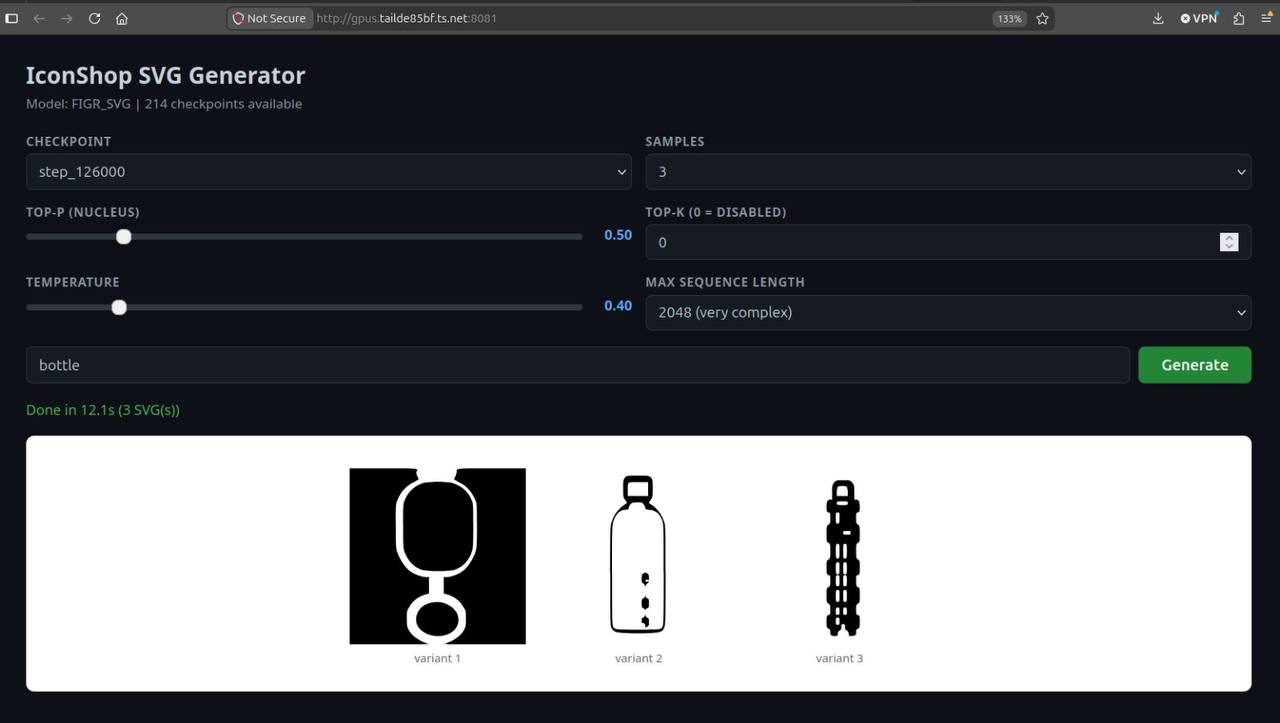
Prompt: "bottle"
The IconShop UI running on our GPU rig at checkpoint step_126000, generating 3 variants with top-p=0.50, temperature=0.40, and max sequence length of 2048.
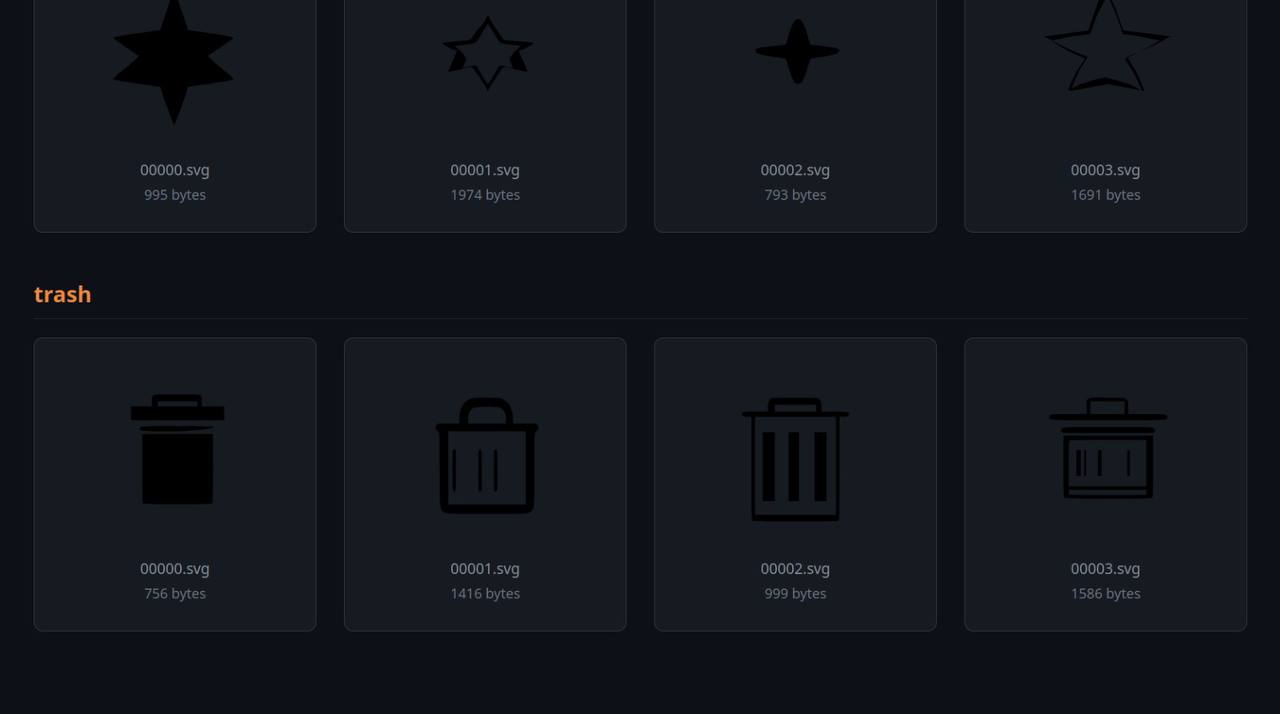
Prompt: "star" and "trash"
Two prompts showing the model's ability to generate multiple icon types. The star icons show good shape recognition, while the trash icons demonstrate consistency in icon style.
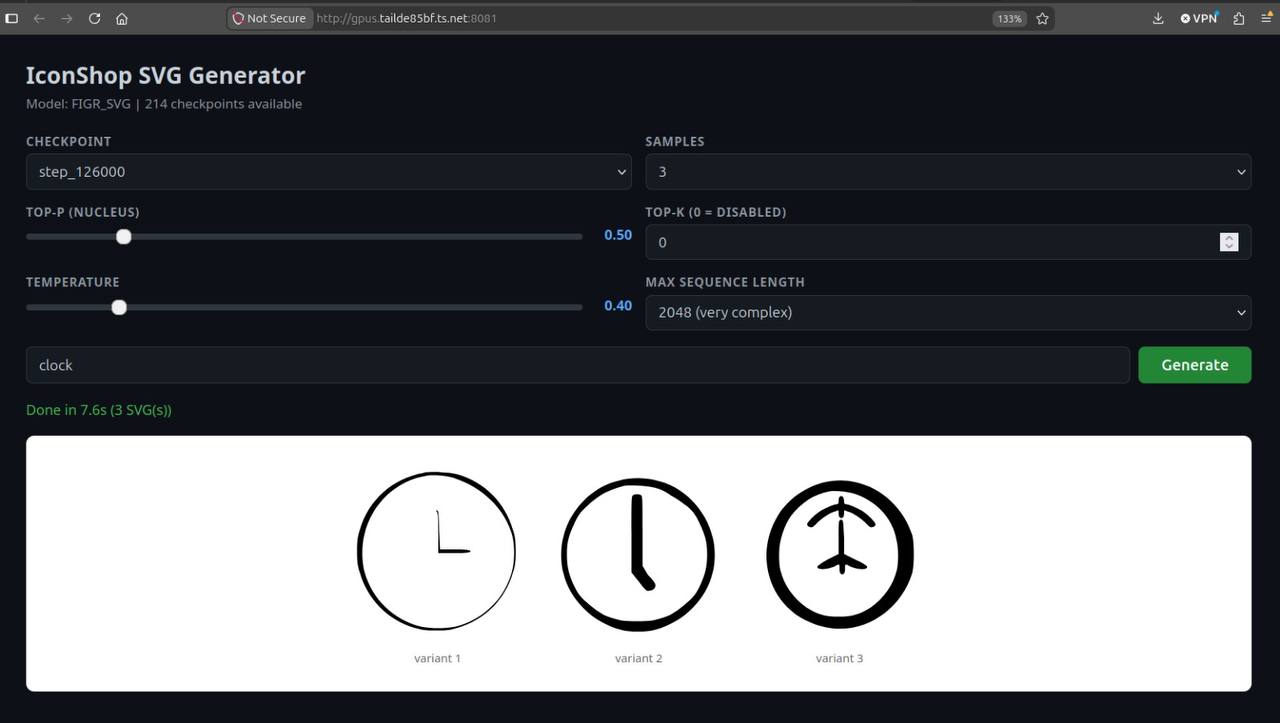
Prompt: "clock"
Same generation settings as the bottle prompt. The clock results show the model's struggle with circular shapes and internal details.
What Went Wrong (and What We Learned)
Every first training run teaches you more from its failures than its successes. Here's what we've observed so far:
- Quality varies by prompt. Simple, common icons (home, search, user) come out cleaner than abstract or complex ones.
- SVG structure is mostly correct. The model learns the XML-like structure of SVGs well — tags close properly, attributes are formatted correctly most of the time.
- Some outputs are valid but wrong. The model will confidently generate an SVG that renders as something other than what you asked for.
- Six epochs wasn't enough. The loss was still trending downward. We know we need more training.
What's Next
This is just checkpoint one. The plan moving forward:
- More training. Go back to the GPU rig with more epochs and potentially a larger dataset.
- Hyperparameter tuning. Learn from Raschka's book what knobs to turn and why.
- Better data curation. The quality of training data matters more than almost anything else in LLM training.
- Evaluation framework. Build tools to systematically score generated icons instead of eyeballing them.
I'll keep updating this post as we iterate. The goal isn't just a better model — it's a better understanding of the craft.
Key Takeaways
- Training a model is different from using one. Even a small training run teaches you things that years of API calls won't.
- First models are never production-ready. And that's fine — the value is in the learning, not the output.
- Collaboration accelerates learning. Having a partner to bounce ideas off of and share the wait time made this project much more enjoyable.
- Books + projects = the best learning combo. Theory without practice is abstract; practice without theory is trial and error. Together they're powerful.
References
- Raschka, S. Build a Large Language Model (From Scratch). Manning, 2024.
- Companion code repository — PyTorch implementations from the book
- kingnobro/IconShop — Original IconShop repository
- "IconShop: Text-Guided Vector Icon Synthesis with Autoregressive Transformers" — Wu, Su, Ma, Liao (arXiv:2304.14400, 2023)